Fintech performance optimization is the discipline of keeping page load, interactivity, and rendering fast while satisfying the security and regulatory constraints that define the sector: mandatory TLS, strict Content Security Policy, Know Your Customer (KYC) and anti-fraud scripts, third-party compliance widgets, and audit logging. These constraints are not optional extras that can be stripped for speed. They shape the entire loading architecture, and treating them as an afterthought is the reason many financial sites pass a Lighthouse audit in a lab but feel sluggish in real browsers.
This guide is organized as a troubleshooting checklist. Each entry follows the same structure: the symptom you observe, the underlying cause, and the fix. Use it to diagnose an existing performance problem rather than as a fresh-build tutorial.
Symptom: The TTFB Is Fine but the Page Still Feels Slow to Paint
Cause: Render-blocking third-party compliance and tag-manager scripts
Fintech sites rarely ship a lean JavaScript bundle. Marketing analytics, fraud detection SDKs, cookie consent managers, session replay tools, and KYC vendor scripts are commonly injected through a tag manager. Each one can block the initial render if it is loaded synchronously or injected before the critical CSS is applied.
A consent-management platform (CMP) that must run before any tracking script is a frequent offender. Because compliance logic often requires it to execute early, teams place it in the <head> without async or defer, and it stalls the parser.
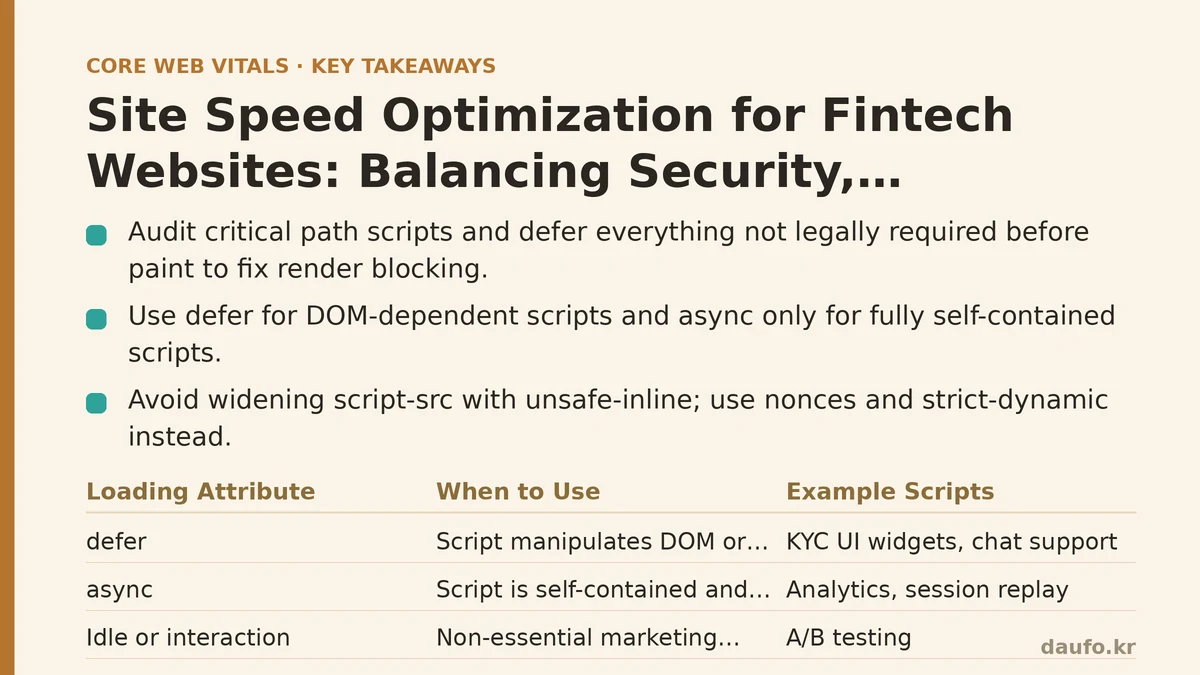
Fix: Audit the critical path and defer everything that is not legally required pre-paint
Start by listing every script in the head and classifying it:
- Must run before paint: CMP for jurisdictions that require opt-in before tracking, feature-detection scripts that set classes on
<html>. - Can run after parse: Analytics, session replay, most KYC UI widgets, chat support.
- Can run on idle or interaction: A/B testing, personalization, non-essential marketing tags.
Then apply the correct loading attribute. Reference the classic pattern below for a deferred, DOM-safe script:
<!-- CMP: must run early, but should not block the document parser -->
<script src="/js/consent-manager.js" defer></script>

<!-- Analytics: independent, no DOM dependency, can execute whenever ready -->
<script async src="https://analytics.vendor.example/gtag.js"></script>

<!-- Fraud/KYC widget: depends on DOM nodes and internal modules, use defer -->
<script defer src="/js/kyc-widget.js"></script>
Use defer when the script manipulates the DOM or depends on another script. Use async only when the script is fully self-contained and load order does not matter. Never mix the two on a script that depends on another module.
For the CMP specifically, check whether the vendor supports a non-blocking loader or an inline stub that queues commands before the full library arrives. Most mainstream CMPs do; the blocking pattern is usually a copy-paste default, not a legal requirement.
Symptom: CSP Violations Appear Only in Production, and Fixing Them Adds Requests
Cause: A predictable CSP is applied inconsistently, and teams over-correct with hashes and nonces
A strict Content-Security-Policy is standard in fintech. But when the policy blocks an inline script or a third-party domain, the fastest “fix” teams reach for is often to add a new allowed host or to widen script-src with 'unsafe-inline'. That trades security for convenience and, over time, produces a policy that is both slow to maintain and no longer meaningful.
Nonces and hashes add no network cost, but they require the server to generate a fresh value per response — which can conflict with aggressive full-page caching.
Fix: Use nonces for the small inline set and prefer strict-dynamic
A practical approach is to generate a per-response nonce on the edge or origin, inject it into the CSP header, and apply it only to the inline scripts you control. Third-party scripts loaded by a trusted nonce’d loader can be allowed via 'strict-dynamic', which lets the loader vouch for the scripts it injects.
# Example response header (values are illustrative)
Content-Security-Policy:
  default-src 'self';
  script-src 'self' 'nonce-RANDOM_PER_RESPONSE' 'strict-dynamic' https:;
  object-src 'none';
  base-uri 'self';
  report-uri /csp-report
Trade-offs to weigh:
- Nonces break full-page caching unless you use a caching layer that supports per-response header injection (many CDNs do, via edge workers or response header manipulation).
'strict-dynamic'requires trust in the loader. If the loader is compromised, the policy offers less protection.- Report-only mode first. Roll out with
Content-Security-Policy-Report-Onlyand observe violations before enforcing. In practice, teams commonly find 3–10 unexpected inline scripts they were not aware of.
Do not use 'unsafe-inline' as a shortcut. It negates most of the protection and, in some audit contexts, raises questions during security review.
Symptom: Lighthouse Passes but Real-User LCP Is Poor
Cause: Lab metrics ignore the effect of TLS negotiation, cold connections, and third-party latency on real devices
A lab run often uses a warm connection to a fast test server. Real users arrive on cold connections, with TLS handshakes, DNS lookups, and, on mobile, occasional network handoffs. Fintech sites also enforce stricter TLS settings — HSTS, certificate transparency checks, OCSP stapling — which add measurable latency when misconfigured.
Two specific misconfigurations recur:
- OCSP stapling is disabled. Clients must fetch the certificate revocation status themselves, adding a round trip and a dependency on the CA’s OCSP responder. When that responder is slow or blocked, the connection stalls.
- No TLS session resumption. Repeat visitors renegotiate from scratch, adding hundreds of milliseconds compared to a resumed session.
Fix: Verify stapling, enable session resumption, and prefer modern TLS
Check stapling with OpenSSL:
openssl s_client -connect your-domain.example:443 -status < /dev/null 2>/dev/null | grep -A 1 "OCSP response"
You want to see a stapled response, not “OCSP Response Status: no response sent.” If stapling is missing, enable it in your web server or load balancer configuration. On nginx, ssl_stapling on; and ssl_stapling_verify on; are the relevant directives; on most managed CDNs stapling is on by default and the issue lies elsewhere.
For session resumption, TLS 1.3 handles this automatically with session tickets, so ensure TLS 1.3 is enabled and TLS 1.0/1.1 are disabled. Verify with:
openssl s_client -connect your-domain.example:443 -tls1_3 < /dev/null 2>/dev/null | grep "Protocol"
Do not enable TLS 1.3 session tickets without rotating keys. Some audit frameworks require ticket key rotation on a defined schedule; check with your security team before turning this on blindly.
Symptom: The Login and Dashboard Pages Feel Slower Than the Marketing Site
Cause: Authenticated pages carry per-user data, avoid CDN caching, and load personalization scripts synchronously
Marketing pages are static and cacheable at the edge. Authenticated pages typically return Cache-Control: private, no-store, so every request hits the origin and includes session validation, database reads, and per-user personalization. These factors are inherent and cannot be eliminated — but the JavaScript behavior around them can.
A common failure mode is a personalization or feature-flagging library that runs before the page renders, blocks on a network request, and only then lets the UI appear. Users see a blank or skeleton state for longer than necessary.
Fix: Render a meaningful first state, then hydrate personalization
Server-render the account overview with placeholder values for anything that depends on personalization, then update those slots after the feature-flag request resolves. This keeps the Largest Contentful Paint element (usually a heading or balance card) stable and early, and prevents a layout shift when the personalized value arrives.
When setting up the flag request, prefer a short timeout with a sensible default:
async function loadFlags(userId) {
  const controller = new AbortController();
  const timeout = setTimeout(() => controller.abort(), 800);
  try {
    const res = await fetch(`/api/flags?user=${encodeURIComponent(userId)}`, {
      signal: controller.signal,
      credentials: 'same-origin'
    });
    if (!res.ok) return DEFAULT_FLAGS;
    return await res.json();
  } catch {
    return DEFAULT_FLAGS;
  } finally {
    clearTimeout(timeout);
  }
}
Trade-offs:
- A hard abort with defaults means some users briefly see the wrong variant, then a corrected state after a slower retry. For a dashboard “new feature” banner, that is fine. For a compliance-critical message, it is not — gate the flag behind a synchronous check or server-render the correct state directly.
- Do not apply this pattern to anything that affects funds, transactions, or legal disclosures. Speed is not worth a wrong value on those surfaces.
Symptom: Images and Charts Look Blurry or Cause Reflow on the Dashboard
Cause: Fixed-dimension placeholders for content that is inherently responsive
Fintech dashboards are full of charts, sparklines, and account balance cards that resize with the viewport and with data. Shipping them with a hardcoded width and height, or setting dimensions after fetch, causes Cumulative Layout Shift — a Core Web Vitals metric that matters increasingly for how users perceive quality.
Fix: Reserve space with intrinsic sizing and use modern image formats
For chart containers, reserve a fixed aspect ratio box even when the chart itself renders later:
<div class="chart-slot" style="aspect-ratio: 16 / 9; min-height: 220px;">
  <!-- chart canvas or svg injected here -->
</div>
For icons, avatars, and institution logos, serve WebP or AVIF with explicit width and height attributes, and set loading="lazy" for anything below the fold.
Reference the trade-off table below when choosing how to load these assets:
| Asset Type | Recommended Loading | Reasoning | When NOT to Use |
|---|---|---|---|
| Above-fold account balance card | Eager, fetchpriority="high" | LCP candidate; delay is directly visible to the user | If the value is personalized and server-render time is unpredictable |
| Institution logos in a list | Lazy | Off-screen on most viewports; not part of LCP | If the logo grid is the hero on a review page |
| Sparkline charts | Defer hydration; reserve space with aspect-ratio | Avoids CLS and wasted JS for offscreen elements | If a sparkline is above the fold and user-visible immediately |
| Marketing hero on unauthenticated pages | Eager, preload the LCP image | Common LCP element on landing pages | If the image is decorative and text is the LCP element |
| KYC identity document thumbnail | Lazy with a blurred placeholder | Contains PII; keep off the critical path | Never eager-load PII images |
Symptom: Adding Compliance Scripts Repeatedly Breaks Core Web Vitals
Cause: Each new vendor is onboarded in isolation with no shared loading strategy
Fintech teams add tools over time: an anti-fraud SDK, a new CMP, a session recording vendor, a regulatory reporting script. Each is tested in a staging environment that includes only the previous tools, so each addition looks harmless on its own. In production, the aggregate cost is the problem.
Fix: Maintain a script inventory with owners, weights, and execution timing
Build and keep a single inventory document or config that lists every third-party script, its business owner, its approximate transfer size and CPU cost, and its loading mode. Review it before any new vendor is onboarded. A minimal version in a config file looks like this:
// script-inventory.js — imported by the tag-loading layer
export const SCRIPT_REGISTRY = [
  { id: 'cmp',        owner: 'legal',      mode: 'defer',  weightKb: 42, critical: true },
  { id: 'analytics',  owner: 'marketing',  mode: 'async',  weightKb: 28, critical: false },
  { id: 'fraud-sdk',  owner: 'risk',       mode: 'defer',  weightKb: 96, critical: true },
  { id: 'chat-widget',owner: 'support',    mode: 'idle',   weightKb: 210, critical: false }
];
A registry like this does two things: it forces the timing decision (defer, async, or load-on-idle) to be explicit, and it surfaces aggregate weight during review. Teams commonly discover that a “small” chat widget or session recorder accounts for the largest share of total third-party bytes.
Do not build a custom loader until you have at least five vendors. For fewer, plain <script> tags with the correct attributes are simpler and equally effective. A registry earns its complexity when the number of vendors and the need to audit them grows.
A Short Verification Loop
After applying any fix above, verify it against real-user conditions, not just synthetic runs. A practical sequence:
- Run
webpagetest.orgwith the “Mobile - 4G” profile from a location that matches your primary audience. - Check the WebPageTest waterfall for any synchronous script still appearing before the first paint.
- Open DevTools Performance panel, record a cold load with cache disabled, and confirm the LCP element renders when expected.
- Confirm CSP violations are not introducing errors that delay scripts by falling back to an unexpected path.
- Recheck the TLS handshake timing in the connection view.
If a fix improves lab scores but not field data, the bottleneck is likely on the client side — device CPU, third-party CPU time, or interaction latency — not the network.
Decisions That Should Not Be Made for Speed
Not every milliseconds-reduction is worth pursuing in a regulated environment. Keep the following out of any performance-driven refactor:
- Removing or delaying the consent banner where jurisdiction requires opt-in before tracking.
- Weakening CSP to reduce inline script friction.
- Deferring the loading of legally required disclosures.
- Replacing server-rendered compliance messages with client-rendered ones that can be blocked.
- Caching authenticated responses at the CDN to improve TTFB.
Performance work on fintech sites is a negotiation between three constraints that do not fully align. The goal is not the fastest site on the internet; it is the fastest site that still passes security review, satisfies the compliance team, and does not introduce a wrong number on a user’s screen.
Related guides: Core Web Vitals Optimization for Finance and Banking Websites: A Troubleshooting Checklist, Partytown: The Web Worker Trick That Fixes Render-Blocking Third-Party Scripts, and Next.js Performance Optimization: Five Priority Fixes That Move Your Core Web Vitals.
🔗 Recommended Reading
- How to Enable Browser Caching on Your Website: A Beginner's Step-by-Step Tutorial
- Web Performance Monitoring Tools Compared: Lighthouse, PageSpeed Insights, and WebPageTest
- CDN vs. Origin Server: Which to Optimize First for Latency
- Common Mistakes That Break Web Font Performance and How to Fix Them
- Core Web Vitals for Beginners: A Step-by-Step Guide to Measuring Your First Audit